
MacBook Pro M1 14-inch (A2442) Water Damage Repair Mumbai: Logic Board Repair, Data Recovery & Why Repair Beats Replacement (2026)

By Shrey Sharma, Founder & Lead Technician · July 2026
Spilled water or chai on your MacBook Pro 14-inch M1 Pro (A2442)? What you do in the next few hours decides whether it's a ₹5,000 clean-up or a ₹35,000 board repair — or a dead machine. Here's the exact protocol, real logic board repair costs, and why chip-level repair almost always beats replacing the whole MacBook.
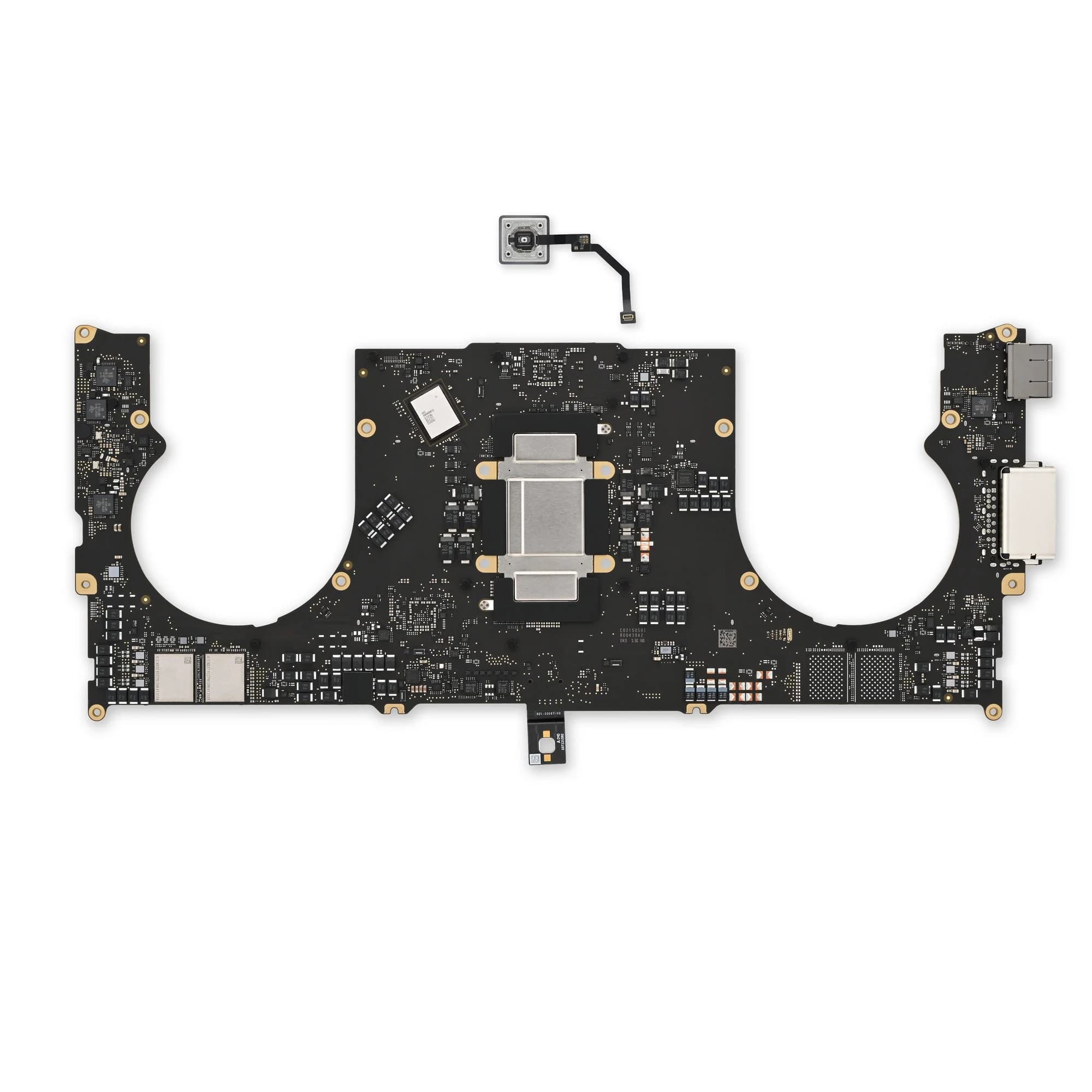
The MacBook Pro 14-inch with the M1 Pro chip (model A2442) is the machine of choice for a lot of editors, developers, and consultants living in Borivali and Kandivali — which also means it's the machine that ends up on a desk next to a chai cup, or in a bag during a monsoon downpour on the way to Borivali station. Water damage on this particular model is not the same as water damage on an older Intel MacBook: the A2442's board is denser, the M1 Pro chip and its memory sit closer to the ports, and there's no separate replaceable SSD to fall back on if things go wrong. What you do in the first few hours after the spill decides almost everything — whether this becomes a same-day ₹5,000 clean, a ₹15,000–₹35,000 chip-level logic board repair, or a MacBook that needs full data recovery. This guide walks through exactly what to do, what's actually at risk inside the A2442's board, real repair costs, and why repairing almost always beats replacing — for customers across Kandivali West, Kandivali East, Borivali West, and Borivali East.
Why the A2442 (M1 Pro 14-inch) Is Especially Sensitive to Water Damage
On the A2442, the M1 Pro or M1 Max chip, its unified memory, and the NAND flash storage are all soldered directly onto one compact logic board — there is no separate, swappable SSD like on older Intel MacBooks. The board also has liquid entry points on both sides: the left edge carries the MagSafe 3 port plus two Thunderbolt/USB-C ports, and the right edge has a third USB-C port alongside the headphone jack. A spill from either side has a short, direct path down to the board. Because storage, memory, and processor sit on the same package, any short circuit that reaches the SoC risks affecting the drive that holds every file on the machine — which is exactly why speed and the right first response matter more on this model than on most.
Do not power the A2442 on to 'just check' if it still works after a spill. If any moisture is still bridging components on the board, powering on completes the circuit and can destroy parts — including the SoC package holding your data — that a same-day clean-up could otherwise have saved.
The First Few Hours: Exactly What to Do
- 1Hold the power button until the MacBook fully shuts down. Do not just close the lid — closing the lid does not cut power to the board.
- 2Unplug the charger and every cable from all three USB-C/Thunderbolt ports immediately. Live current through a wet board is what turns a cleanable spill into a destroyed component.
- 3Open the lid fully and stand the MacBook upside down in an inverted-V, keyboard side down, on a dry towel — this lets liquid drain away from the logic board and screen hinge instead of pooling near them.
- 4Do not use a hairdryer and do not bury it in rice. Heat bakes sugars and mineral residue onto the board, and rice does nothing for liquid that's already inside a sealed aluminium chassis.
- 5Do not press any key or the trackpad to 'test' it, and do not plug it in again to see if it charges.
- 6WhatsApp or call us at +91 77000 44192 straightaway with what spilled, how much, and which side of the keyboard — we'll tell you what to do next before you even leave the house.
- 7Get it to us the same day if at all possible. If you're in Borivali East, Borivali West, Kandivali East, or Kandivali West, free pickup can usually reach you within 1–2 hours.
Why Every Hour Matters More Than the Water Itself
Water alone rarely destroys a logic board on the spot. What destroys it is corrosion — the reaction between dissolved minerals in tap water, rainwater, or chai and the copper traces and solder joints on the board. Mumbai's monsoon humidity from June through September accelerates that reaction, and it doesn't pause while you decide what to do.
| Time Since Spill | What's Typically Happening on the Board | Likely Outcome |
|---|---|---|
| Within 2 hours | Liquid is present but corrosion hasn't set in | Ultrasonic clean only, no parts replaced, usually same-day |
| 6–12 hours | Early corrosion forming on exposed pads and pins | Clean-up plus possibly one component; still straightforward |
| 24 hours | Corrosion has usually reached at least one IC or connector | One to a few components replaced at chip level |
| 72+ hours, or powered on after the spill | Corrosion has spread to traces, or a short has damaged the SoC/board directly | Multi-component or trace repair; data recovery may be needed |
What's Actually at Risk Inside the A2442's Logic Board
- The M1 Pro/M1 Max SoC package — combines the processor, GPU, and unified memory. A direct short here is the most serious failure mode on this model.
- The NAND flash storage — soldered next to the SoC. This is where every file on your MacBook physically lives, since there is no removable drive.
- The MagSafe 3 and USB-C/Thunderbolt port controllers — on both the left and right edges, the two most common liquid entry points.
- The PMIC (power management IC) — controls power distribution across the board; a shorted PMIC is why some water-damaged MacBooks show zero signs of life at all.
- Keyboard flex cable connectors — liquid poured onto the keyboard often pools here before it ever reaches the main board area.
- Speaker amplifier and audio codec components near the palm rest, which sit close to the trackpad cable routing.
Chip-Level Logic Board Repair vs. Full Board Replacement
Apple's authorised service centres generally have two answers for a water-damaged A2442: replace the entire logic board, or write off the machine. A full replacement logic board for a 14-inch M1 Pro MacBook sourced through Apple's channel runs well into six figures in parts alone before labour — often more than half the price of a brand-new machine. Chip-level repair is a different approach entirely. Instead of swapping the whole board, our technicians use a stereo microscope, ultrasonic cleaner, hot air rework station, and BGA soldering tools to find and replace only the specific component that actually failed, leaving the rest of the board — including the parts Apple would have thrown away with it — untouched and working.
- 1Ultrasonic cleaning in an isopropyl alcohol bath to lift corrosion and mineral residue from every surface, including under components that can't be reached with a swab.
- 2Full board inspection under a stereo microscope to map corrosion, discoloured pads, and any visibly damaged components.
- 3Component-level electrical testing with a multimeter to isolate exactly which part is shorted or open, rather than guessing from visible damage alone.
- 4Targeted removal and replacement of only the failed component — a PMIC, a port controller, a handful of capacitors — using micro-soldering.
- 5Full functional testing after reassembly: charging on all three ports, display, camera, keyboard, Thunderbolt, Wi-Fi, Bluetooth, audio, and battery health reporting.
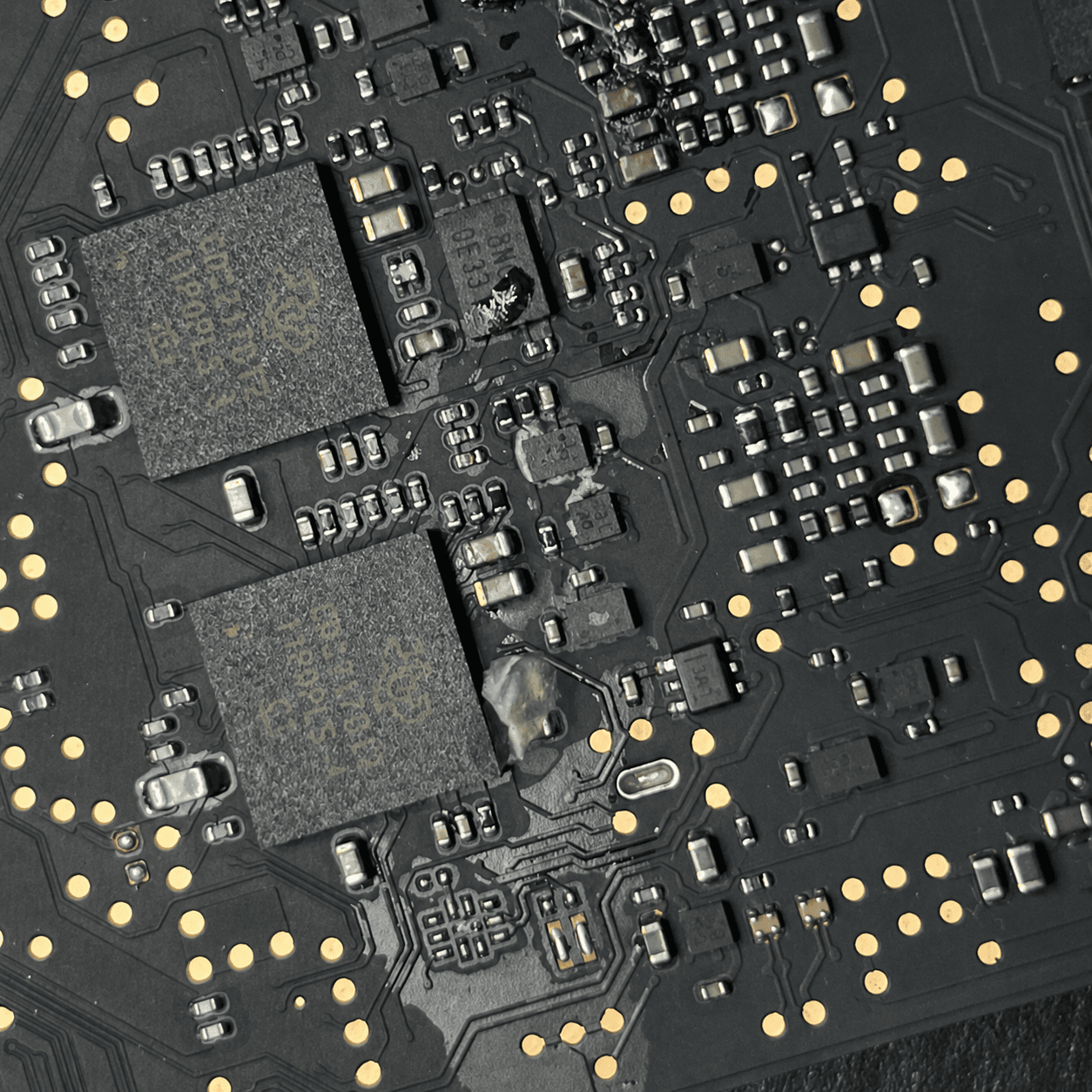
Chip-level logic board repair for a water-damaged A2442 typically costs a fraction of an Apple board replacement, because only the failed component is replaced instead of the entire board. It's the same reason a full board swap should be treated as a last resort, not a first quote.
A2442 Water Damage Repair Cost in Mumbai (2026)
No honest technician can quote a fixed price before opening the machine — the true cost depends entirely on what the liquid actually reached. These are realistic ranges for chip-level A2442 water damage repair at Mac Repair Center, based on the extent of the damage found during diagnosis.
| Damage Level | What It Involves | Typical Cost (A2442) |
|---|---|---|
| Surface corrosion only | Ultrasonic clean, no component replacement | ₹4,000 – ₹6,000 |
| Moderate — 1–2 components | One or two ICs or passive components replaced | ₹8,000 – ₹15,000 |
| Significant — multiple components | Several components across the board reworked | ₹15,000 – ₹28,000 |
| Severe — trace damage or SoC affected | Micro-soldering to bridge damaged traces, or data recovery required | ₹25,000 – ₹35,000 |
For comparison, keyboard/top-case replacement on this model (needed only if keys are physically stuck or dead) runs ₹14,000–₹22,000, and a Liquid Retina XDR display replacement — needed if liquid reaches the screen hinge — runs ₹22,000–₹38,000. This is exactly why flipping the MacBook upside down immediately after a spill matters: it keeps liquid away from the hinge and away from the most expensive secondary repair on this model.
Logic Board Repair for Data Recovery: Will Your Files Survive?
On the A2442, all your data lives on NAND flash chips soldered beside the M1 Pro SoC — solid state, with no moving parts, so liquid exposure alone does not erase it. What can affect your data is a short circuit reaching the storage or SoC package, which is why the single most damaging thing you can do is power the machine on to check it. If the board is repaired successfully at chip level, your files, apps, and settings are simply there, exactly as you left them. If the damage has gone further — a shorted SoC, or trace damage that reaches the storage — targeted data recovery from the NAND chips directly is often still possible, though it's a more specialised process handled separately from the board repair. Either way, we test whether the machine can be safely powered up before recommending any repair, and we flag data-recovery risk upfront rather than after the fact.
Why Repair Is Almost Always the Better Option Than Replacing Your MacBook
- Cost: even the most severe A2442 water damage repair tops out well under ₹40,000 — a new 14-inch MacBook Pro with an M-series chip starts well above ₹1,90,000 today.
- Your data stays put: a repair keeps your existing files, licensed software, and settings exactly as they were. A replacement means starting from a backup, if you have one, and reinstalling everything else from scratch.
- Turnaround: most chip-level repairs finish in 1–4 business days. Sourcing, setting up, and migrating to a brand-new MacBook usually takes longer once you count reinstalling every app and tool you use for work.
- It's the same machine you already trust: no re-learning a new keyboard feel, no re-pairing every accessory, no re-authorising every piece of software licensed to that specific device.
- 90-day warranty: every chip-level repair at Mac Repair Center is backed by a 90-day warranty on the repaired component and labour, the same protection you'd expect from any parts replacement.
If Apple or another shop has already told you the A2442's logic board 'can't be repaired' and needs full replacement, it's worth getting a second opinion before writing the machine off. Most AASPs are only equipped to swap the entire board — they aren't set up for component-level repair, so 'unrepairable' in their system usually just means 'not repairable with the tools we have.'
MacBook A2442 Water Damage Repair — Serving Borivali East, Borivali West, Kandivali East & Kandivali West
Mac Repair Center is based at Shop No. F-103, Raghuleela Mega Mall, Kandivali West — a short walk from Kandivali station, and roughly 10–15 minutes from Kandivali East and from Borivali West and Borivali East. If your MacBook Pro 14-inch M1 Pro has just gotten wet, don't wait to travel — WhatsApp us and we'll arrange free pickup from anywhere in these areas, usually within 1–2 hours. You'll get a written diagnosis and exact repair cost the same day, with no obligation to proceed, before any work starts on the board.
Can a MacBook Pro M1 14-inch (A2442) survive water damage without losing data?
Yes, in most cases — provided it isn't powered on after the spill. The NAND storage on the A2442 is solid state and isn't damaged by liquid on its own. Data loss risk comes almost entirely from a short circuit caused by powering on a wet device, which can damage the SoC package the storage sits beside.
How much does A2442 water damage logic board repair cost in Mumbai?
Chip-level water damage repair for the MacBook Pro 14-inch M1 Pro (A2442) at Mac Repair Center ranges from ₹4,000 for surface corrosion cleaning up to ₹35,000 for severe cases involving trace damage or multiple failed components. The exact cost depends on what's found during free diagnosis before any repair begins.
Is it better to repair or replace a water-damaged M1 Pro MacBook?
Repair is almost always the better financial and practical choice. Even severe A2442 water damage repair costs a fraction of a new 14-inch M-series MacBook Pro, and repair preserves your existing data, licensed software, and settings — something a replacement device cannot do.
Do you offer free pickup for water-damaged MacBooks in Borivali and Kandivali?
Yes. We offer free pickup and drop across Kandivali West, Kandivali East, Borivali West, and Borivali East, along with 20+ other Mumbai areas. For water damage specifically, speed matters, so we prioritise same-day pickup wherever possible.
What if another shop or Apple already said the logic board can't be repaired?
It's worth a second opinion before accepting that. Apple Authorised Service Providers typically only offer full board replacement, so a logic board they classify as unrepairable may still be recoverable through chip-level component repair, often at a fraction of the replacement cost.
How long does A2442 logic board water damage repair take?
Diagnosis is same-day in most cases. Surface corrosion cleaning is often completed the same day as diagnosis. Single-component repairs typically take 1–2 business days, and multi-component or trace-damage repairs take 2–4 business days depending on parts availability.
MacBook A2442 Gotten Wet? Every Hour Counts — Call Now.
WhatsApp +91 77000 44192 with what spilled and we'll tell you exactly what to do before you even bring it in. Free pickup from Borivali East, Borivali West, Kandivali East, Kandivali West, and 20+ other Mumbai areas. Free diagnosis, written quote before any work begins, and a 90-day warranty on every repair. Visit us at Shop No. F-103, Raghuleela Mega Mall, Kandivali West, Mumbai 400067.
Free pickup available across all Mumbai areas · Mon–Sat 10am–8pm
10+ years of chip-level Apple repair experience in Mumbai. Specialises in MacBook logic board micro-soldering, data recovery, and complex Apple hardware faults. Every repair backed by a 90-day warranty.
Related Services & Repairs
More from the Blog
MacBook Liquid Damage Repair Mumbai — Not Turning On? Fix It for 90% Less Than Apple
MacBook stopped working after a spill in Mumbai? Component-level logic board diagnosis — PPBUS_G3H shorts, charging IC failure, SMC corrosion — resolved same day with data preserved. Call 7700044192.
MacBook Pro M1 14-inch (A2442) Not Charging: Other Shops Quoted ₹12,000 for a Battery That Wasn't Faulty — We Fixed the Real Fault for ₹7,000
A MacBook Pro 14-inch M1 Pro (A2442) arrived dead and not charging. Other repair shops blamed the battery and quoted ₹12,000 for a replacement. The battery was fine — the real fault was in the motherboard's charging section. We repaired it for ₹7,000, and the original battery now charges and holds backup normally.
What to Do Immediately After Spilling Water on Your MacBook
The first 60 seconds after liquid damage determine whether your data can be saved. Here's the exact steps our technicians recommend.
Apple Device Problem?
Get It Fixed Today — Free Diagnosis.
Mumbai's chip-level Apple repair specialists. Same-day repair · 90-day warranty · 100% data privacy. Don't settle for a slow fix or a replacement you don't need.
Open Mon–Sat · 10:00 AM – 8:00 PM · Mumbai